How to Delete Your Account
To delete your gigit account:
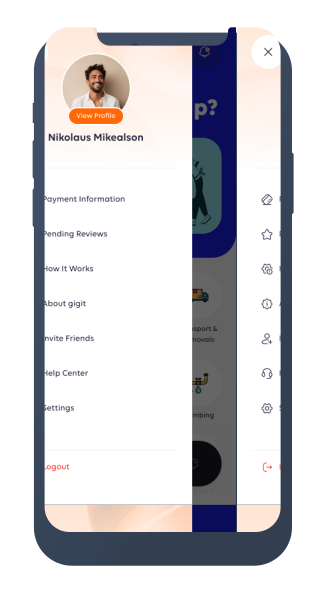
- Open the side menu in the gigit app.
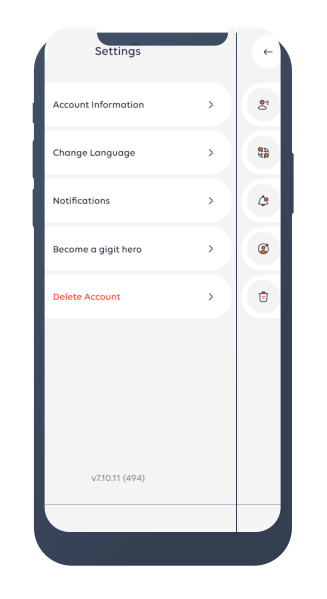
- Tap Settings.
- Tap Delete Account.
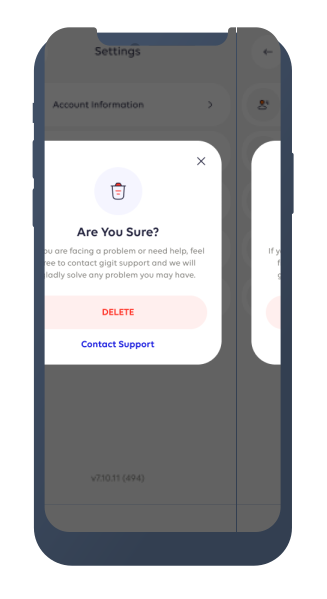
- On the confirmation screen, tap Delete.
Once confirmed, your account will be deleted and you will no longer be able to access it.
Permanent Account Deletion
When your account is deleted:
- You will lose access to your gigit account.
- Your personal information will be deleted or anonymised unless gigit is required or permitted to retain it.
- Your account cannot be restored by logging back into the app.
If you are experiencing a problem and would like help before deleting your account, select Contact Support on the confirmation screen.
Information We May Retain
As an online services marketplace, gigit may need to retain certain records after an account is deleted to comply with applicable laws and legitimate business requirements.
Depending on how you used gigit, retained information may include:
- Identity and KYC verification records
- Task, offer, booking, payment, payout, refund, and transaction records
- Records relating to complaints, disputes, safety incidents, or fraud investigations
- Accounting, tax, audit, and compliance records
- Information required to establish, exercise, or defend legal claims
Retained information will be securely stored, access will be restricted, and the information will only be kept for as long as necessary or required by applicable law.
Information Deleted or Anonymised
gigit will delete or anonymise personal information that is no longer required, which may include:
- Profile information
- Contact information
- Account preferences and settings
- Device, session, and notification data
- Other personal information that gigit is not required or permitted to retain
Contact Us
If you have questions about deleting your account or how your information is retained, please contact gigit Support through the Help Center in the app or you can send an email to [email protected]